関税はお客様のご負担となりますが、標準ロジスティクスでは、米国、DE、英国、カリフォルニア、フランス、IT、PL、AT、JP...など、ほとんどの国へのDDPを免税でサポートしています。





















































You can physically add a Fiber Splitter to an FTTH line, but that does not automatically create a second working Internet connection. On an ISP-managed PON, every ONU or ONT must be compatible with the access system, receive enough optical power, complete activation and be authorized and provisioned by the operator.
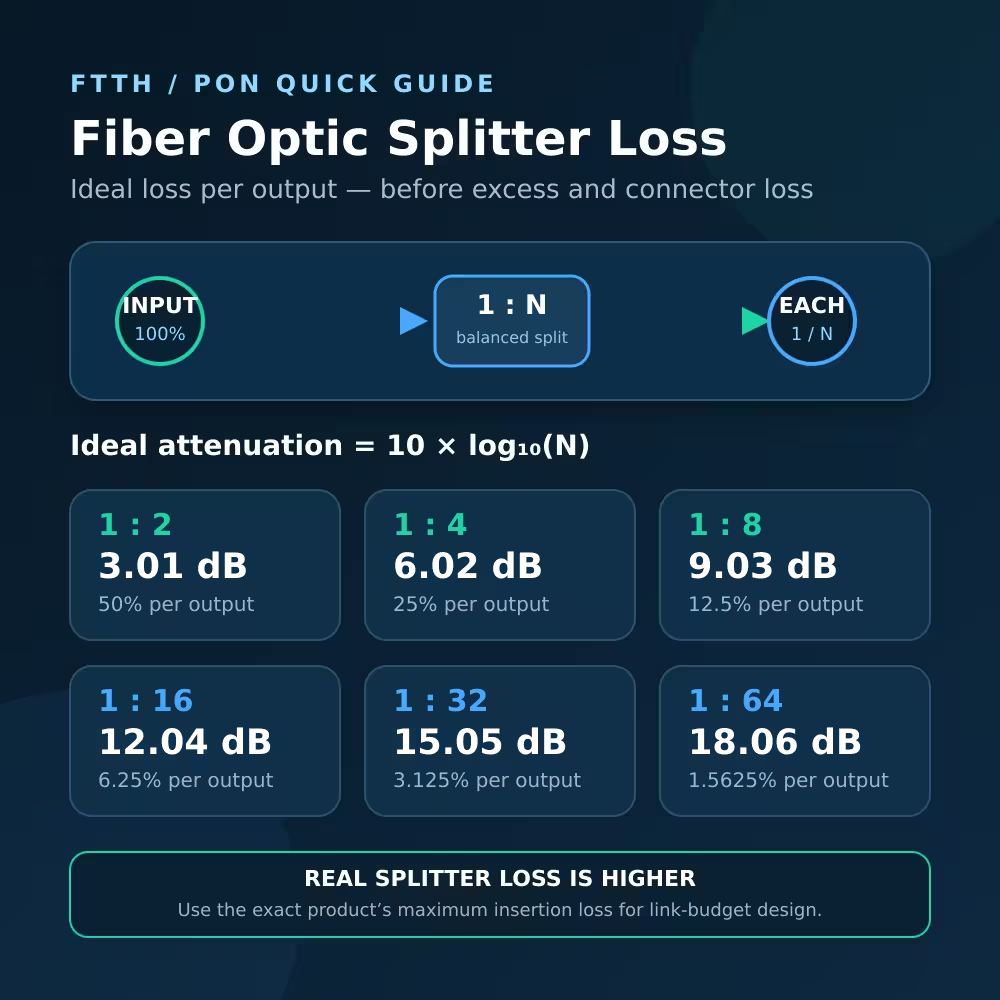
Adding a 1×2 splitter also reduces the optical power reaching the existing ONU. An ideal equal split costs about 3.01 dB per output; a real splitter has additional excess loss. The new connectors, adapters and fiber add still more loss.
If your goal is simply to connect more computers, access points or rooms, keep one working ONU and add an Ethernet switch, router or access point on its LAN side. Ask the ISP for a second service or approved second ONU when two independent optical terminals are actually required.

Add a Fiber Splitter to an FTTH Line: Quick Answer
| What you want to do | Will a passive splitter solve it? | Better next step |
|---|---|---|
| Add more Ethernet devices | いいえ | Connect an Ethernet switch after the working ONU or router |
| Improve Wi-Fi in another room | いいえ | Use Ethernet or an approved backhaul to an access point or mesh node |
| Run a second ISP ONU | Not by itself | Ask the ISP to provision a second ONU and verify the optical budget |
| Build a private PON you control | Possibly | Calculate loss, configure the OLT and activate each compatible ONU |
| Divide a point-to-point optical Ethernet link | Normally no | Use an active Ethernet switch or a correctly designed point-to-multipoint system |
| Tap light for monitoring | Only as an engineered design | Use the correct tap ratio, instrument and revised loss budget |
The connector fitting is not proof that the network will operate. A passive optical device can divide light, but it cannot create subscriber credentials, OLT capacity, service VLANs or a second billing account.
What a Passive Fiber Splitter Actually Does
A PLCスプリッタ is an unpowered optical component. A 1×2 version divides one input into two outputs and combines upstream light from the two branches toward the common port.
In a PON, the OLT at the provider side and multiple ONUs at subscriber locations are designed to share this passive tree. Downstream optical transmissions propagate through the splitter toward every branch. The protocol identifies the traffic intended for each ONU and provides security mechanisms. Upstream ONUs do not transmit whenever they want; the OLT controls shared upstream access with time-division and bandwidth-allocation mechanisms.
ITU-T G.984.3 specifies GPON framing, upstream time-division multiple access, dynamic bandwidth assignment and ONU activation. The Fiber Optic Association FTTH architecture guide illustrates the bidirectional splitter tree and explains that splitter loss limits a PON link.
The important distinction is:
A splitter creates another optical branch. The OLT creates and controls another logical subscriber connection.
Why a Second ONU Usually Does Not Work Immediately
1. The OLT has not activated or authorized it
A GPON ONU goes through parameter learning, serial-number discovery, ranging and operation states. The OLT assigns an ONU-ID during activation. Operators may also use a serial number, registration ID, PLOAM password, LOID or other approved fields and provisioning records.
A new ONU can receive downstream light yet remain unregistered because the OLT does not recognize or authorize it. Even a registered ONU still needs the correct service profile, VLAN mapping and WAN configuration before Internet access works.
Do not copy or clone identifiers from another subscriber or operate duplicate identities. That may disrupt service, violate provider policy and make troubleshooting unreliable. Use the operator’s authorized activation process.
2. The added splitter consumes optical budget
Every split sends only part of the input power to each output. For an equal 1×2 split:
Ideal splitting loss = 10 × log10(2) ≈ 3.01 dB
That is only the theoretical division. A finished splitter also has excess loss and output variation. LuLeey’s verified 1×2 SC/APC PLC splitter lists a maximum insertion loss of 4.0 dB for P Grade and 4.2 dB for S Grade, with operation from 1260 to 1650 nm.
Suppose the original ONU receives -20 dBm. Adding a component specified at up to 4.0 dB could reduce the level to approximately -24 dBm before counting new adapters, fiber and connection loss:
Estimated new level = -20 dBm - 4.0 dB = -24 dBm
This is an illustrative calculation, not a universal pass/fail test. Compare the worst-case result with the exact OLT and ONU transmitter, receiver-sensitivity and overload specifications. Measure the finished path with equipment suitable for the PON wavelengths and live-network conditions.
3. The existing ODN may already contain splitters
The drop entering a home is often already one output of a neighborhood splitter. Adding another 1×2 stage creates a cascaded split, so its loss is added to every existing splitter, connector, splice and fiber segment in that path.
For example, a 1×2 stage after one output of a 1×32 splitter gives the two new paths the splitting loss of a cascaded 1×64 route (32 × 2), while the other 1×32 outputs remain unchanged. It does not mean the OLT configuration or optical class supports those two paths.
LuLeey’sを使って fiber optic splitter loss guide to calculate every stage with the actual maximum component loss rather than the ideal number alone.
4. Both ONUs share one PON channel
Two authorized ONUs on the same PON port share OLT capacity and upstream scheduling with other ONUs on that tree. A splitter does not give each new branch an independent copy of the full PON line rate.
The service plan, OLT scheduling, oversubscription, ONU interfaces and LAN equipment all affect usable throughput. A second ONU can also require a separate service profile or account even when the optical path is technically valid.
5. The connector can fit but still be wrong
SC/APC and SC/UPC are different polish types. Do not mate them directly. A mismatched, dirty or damaged connection can add loss and reflection.
Also verify:
- Single-mode versus multimode fiber
- Connector family and polish at every interface
- Splitter operating wavelength range
- Splitter direction and port labeling
- Patch-cord condition and bend radius
- Enclosure, strain relief and dust protection
Never look into an unknown fiber. Treat it as potentially active, and use appropriate inspection and power-measurement procedures.
Can You Put a Fiber Splitter After the ONT?
An ONT or ONU normally converts the PON service to Ethernet, voice, Wi-Fi or other subscriber interfaces. Its optical PON port is not a pass-through output, so placing a PON splitter “after” the ONT does not describe a normal topology.
Use this layout for more local network connections:
ISP fiber → one authorized ONU/ONT → router or Ethernet switch → local devices
Do not connect an optical splitter to an Ethernet port. Copper Ethernet requires active ports that transmit, receive, negotiate and switch frames. A passive optical splitter and a passive RJ45 “splitter” are not substitutes for an Ethernet switch.
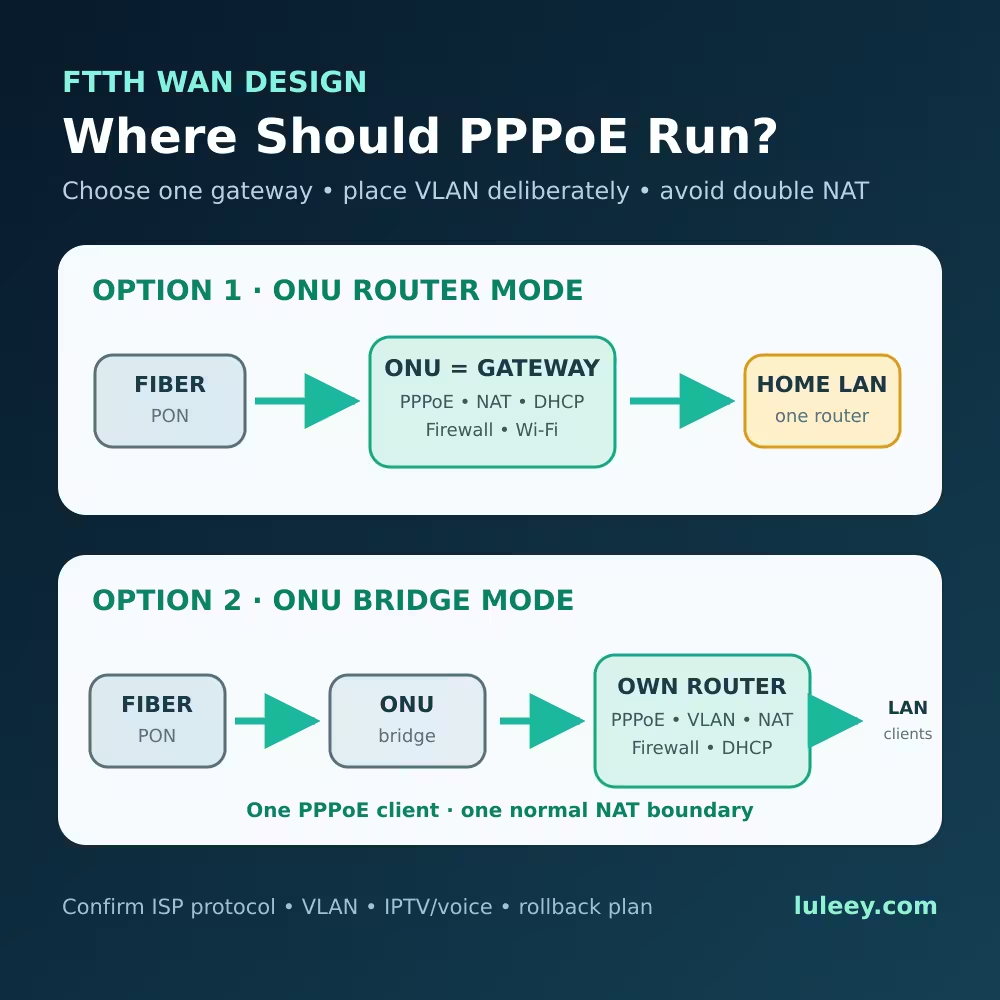
If the ONT is already a router, decide whether it will remain the main gateway or whether an external router will be used with an ISP-approved bridge configuration. Avoid creating accidental double NAT while trying to add ports.
What If the FTTH Service Uses Point-to-Point Ethernet?
Not every FTTH service is a PON. Some networks give each subscriber a dedicated point-to-point optical Ethernet link or connect users through an active field switch.
A standard Ethernet optical transceiver expects a point-to-point link partner and usually uses separate transmit and receive paths or defined bidirectional wavelengths. Inserting a passive PON splitter does not convert that link into Ethernet multipoint service. The additional loss and optical topology may simply break the link.
Before buying any splitter, identify the access technology from provider documentation and exact equipment—not from the connector shape alone.
When Adding a Splitter Can Be Valid
Adding a splitter can be appropriate when you operate the PON or are working under the network owner’s approved design.
A valid private-PON or operator project requires:
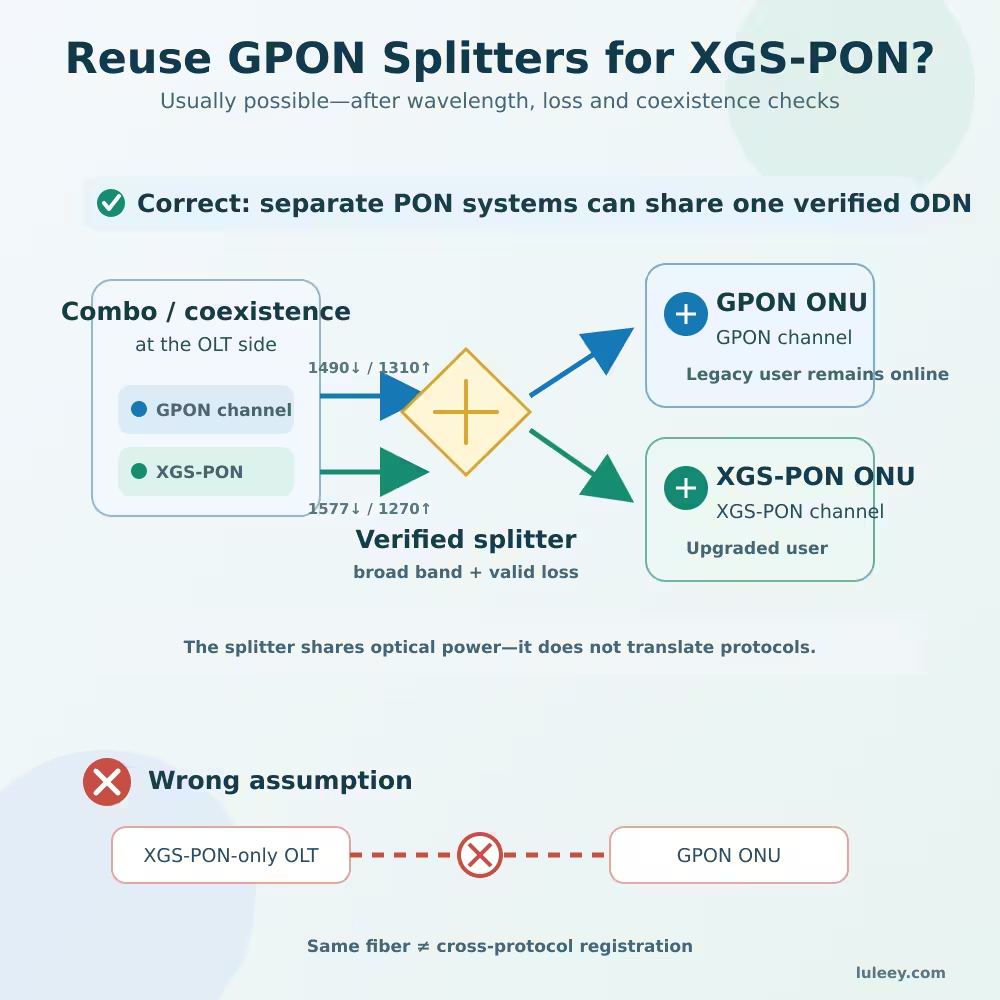
- A PON OLT and compatible ONUs using the same supported standard.
- An approved split ratio and physical topology.
- Separate downstream and upstream optical-budget calculations.
- Splitters specified for every required wavelength.
- Correct connectors, polish, fiber type and enclosures.
- OLT activation and provisioning for every ONU.
- Service configuration such as VLANs, DHCP, PPPoE or management profiles.
- Optical, registration and traffic tests on the completed branches.
An optical monitoring tap is another valid use, but the tap ratio and added loss must be designed for the instrument and production link. A 50:50 splitter is rarely a sensible casual monitoring tap because it removes roughly half the optical power before excess losses.
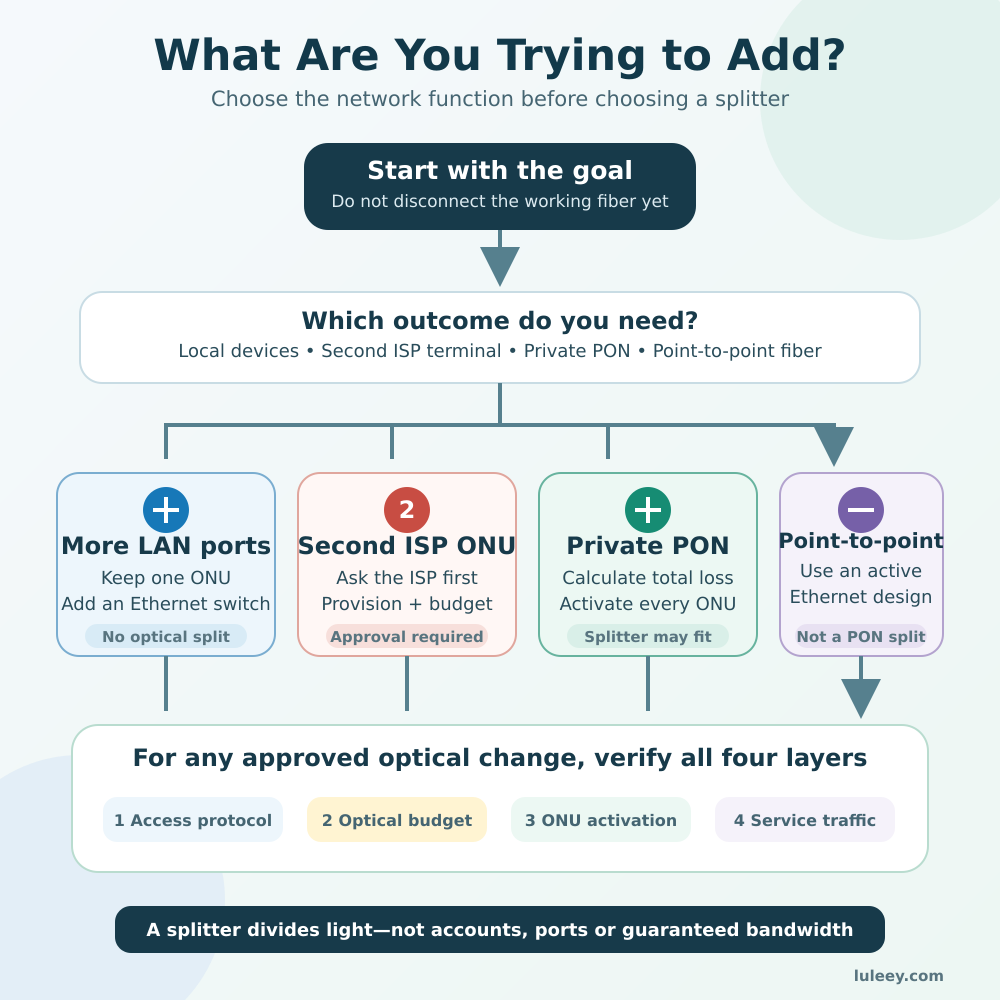
A Seven-Step Check Before Changing the Fiber
Step 1: Define the real goal
Write down whether you need more LAN ports, better Wi-Fi, a second subscriber service, a lab ONU or an optical test point. Different goals require different designs.
Step 2: Identify the access system
Confirm whether the line is GPON, EPON, XG-PON, XGS-PON, point-to-point Ethernet or another service. Check the OLT and ONU requirements with the network owner.
Step 3: Record the working state
Before disconnecting anything, record the ONU state, received power if available, service status and connector polish. Photograph port labels without exposing or bending the fiber.
Step 4: Ask whether another ONU is allowed
For an ISP-managed line, obtain approval and the exact activation process. Ask whether the same PON port and ODN can support another ONU and whether a second account is required.
Step 5: Calculate the complete loss
Add the guaranteed maximum insertion loss of the new splitter, all existing splitter stages, fiber, connectors, adapters, splices and engineering margin. Check both transmission directions against the exact optics.
Step 6: Match and clean every interface
Use the correct fiber mode, connector family and polish. Inspect and clean with appropriate equipment. Cap unused splitter outputs to protect them from contamination.
Step 7: Validate every layer
After an authorized change, verify optical power, PON activation, ONU provisioning, VLAN or WAN session, IP addressing and traffic. A green optical or PON light does not prove that Internet, IPTV, voice and management services are all correct.
Better Solutions for Common Goals
“I need Internet in another room”
Keep the authorized ONU in place. Run Ethernet or an approved fiber-Ethernet link from the LAN side to a switch or access point in the other room.
“I need more Ethernet ports”
Add a suitable Ethernet switch after the router or gateway. Confirm the required link speed, VLANs, PoE budget and whether the switch should be managed.
“I want two independent Internet accounts”
Ask the ISP for a second service and approved installation. The provider may reuse part of the ODN, assign another port or install additional fiber based on its design.
“I want to test two ONUs in a lab”
Use a PON OLT you are authorized to configure. Select a verified splitter, calculate the budget, activate each ONU with a unique approved identity and confirm service profiles independently.
“I only want to relocate the ONU”
Use a compatible single-mode patch cord and adapter, or have the fiber professionally extended. A splitter is unnecessary when no second branch is required.
Choosing a LuLeey Splitter for an Approved Design
LuLeey’s 1×2 PLC model provides one 50:50 input-to-two-output split with single-mode G.657A fiber and SC/APC connectors. The product page specifies 1260–1650 nm operation, P Grade insertion loss of no more than 4.0 dB, uniformity of no more than 0.4 dB and fully passive operation.
Those specifications describe the component, not automatic compatibility with an ISP service. Before selecting it, provide LuLeey or the network designer with:
- Access technology and exact OLT/ONU models
- Network-owner authorization
- Existing splitter stages and ratios
- Current and worst-case optical power
- 必要な波長
- コネクタの種類と研磨仕上げ
- Fiber and route length
- Required number of branches
- Optical class and engineering margin
- Enclosure and installation environment
最終的な答え
You can add a passive splitter to a correctly designed FTTH PON, but a user-installed splitter does not automatically create another Internet connection.
Before adding one, verify:
- The access network is actually a compatible PON.
- The operator permits and provisions the second ONU.
- The new splitter and every connection fit the optical budget.
- Fiber type, wavelengths, connectors and polish match.
- Both branches pass optical, activation and service tests.
If you only need more devices or wider Wi-Fi coverage, keep the single authorized ONU and expand the Ethernet LAN. For a private PON or operator-approved branch, select the splitter from measured loss and provisioning requirements—not from connector fit alone.


 SFP/SFP+ (1G/2.5G/5G/10G)
 SFP-T (1G/2.5G/10G)
 AOCケーブル 10G/25G/40G/100G
 DACケーブル 10G/25G/40G/100G
 qsfp28 qsfp+ sfp28 100g/40g/25g
 銅線-光ファイバー・メディア・コンバーター
 ファイバーメディアコンバータPCBAボード
 OEOファイバー・メディア・コンバーター
 シリアル-ファイバー・メディア・コンバーター
 ビデオ-ファイバー・メディア・コンバーター
 1000m Gポン/エポン・オヌ
 10Gエポン・オヌ/XG-PON/XGS-PON
 2.5g Gpon/XponスティックSFP ONU
 ポー・グポン/エポン・オヌ
 ワイヤレスGPON/EPON ONT
 エポンOLT
 GPON OLT
 SFP PONモジュール
 産業用スイッチ
 マネージド・スイッチ
 POEスイッチ
 アンマネージド・スイッチ
 MTP/MPOファイバーケーブル
 光ファイバーカセット
 光ファイバーループバック
 光ケーブルとファイバーピグテール
 光スプリッターとスプリッターボックス
 ファイバーフランジコネクター
 光アダプター
 光減衰器
光減衰器 クイックコネクターとコネクターパネル
 CATVアンプ
 CATV光受信機
 ビジュアル・フォルト・ロケーター
 OTDR
OTDR 光パワーメーター
 光ファイバー識別器
 光ファイバー・クリーナー
 ファイバー・クリーバー&ファイバー・ストリッパー
 銅工具
銅工具


