BLACK FRIDAY SALE: 10% OFF Orders $100+ | Customs duties are the responsibility of customers, but standard logistics support DDP to most countries, duty-free such as US, DE, UK, CA, FR, IT, PL, AT, JP…




Clean, Low-Visibility Fiber Connections for Every Room
Upgrade your indoor fiber infrastructure without leaving bulky or highly visible cables along your walls.
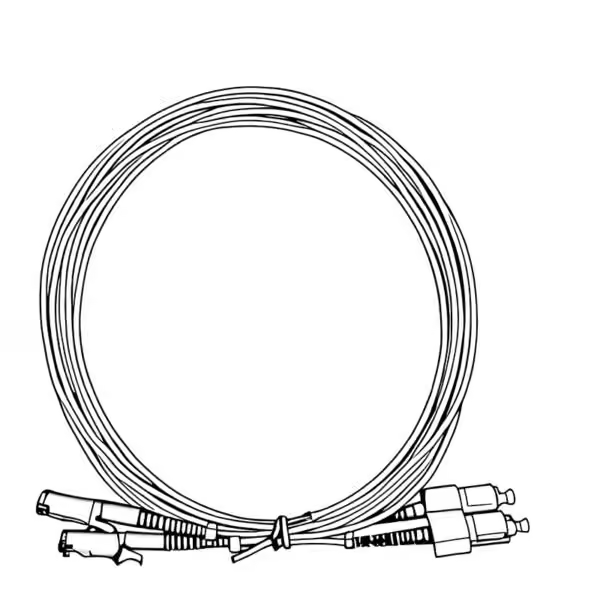
The Luleey FTTR Transparent Fiber Cable solution uses G.657A2 bend-insensitive single-mode fiber and transparent corner-routing accessories to create discreet indoor optical connections for homes, apartments, villas, hotels and offices.
Route fiber neatly along wall edges, ceiling lines, door frames and skirting boards while preserving the appearance of your interior.
G.657A2 Fiber | Low-Visibility Routing | Flexible Connector Options | Custom Cable Lengths
Shop Transparent Fiber Cable | Explore Corner Protectors
What Is FTTR Invisible Fiber Cabling?
FTTR stands for Fiber to the Room, a networking approach that extends optical fiber connections closer to individual rooms instead of relying entirely on conventional indoor copper cabling or wireless connections between network nodes.
In many homes, the main broadband connection enters near the living room or entrance. However, bedrooms, study rooms and home offices may be separated by walls or long indoor distances.
FTTR cabling provides a way to establish optical connections between the main fiber distribution point and compatible equipment in different rooms.
One practical challenge is installing fiber without affecting the appearance of finished walls and interior decoration.
Luleey transparent indoor fiber cable addresses this challenge with a colorless, low-visibility design that can follow common architectural edges.
The cable uses G.657A2 single-mode fiber, which offers improved bending performance compared with conventional single-mode fiber and is well suited to carefully planned indoor routing.
The result is a cleaner indoor fiber infrastructure for broadband extensions and compatible FTTR networking systems.
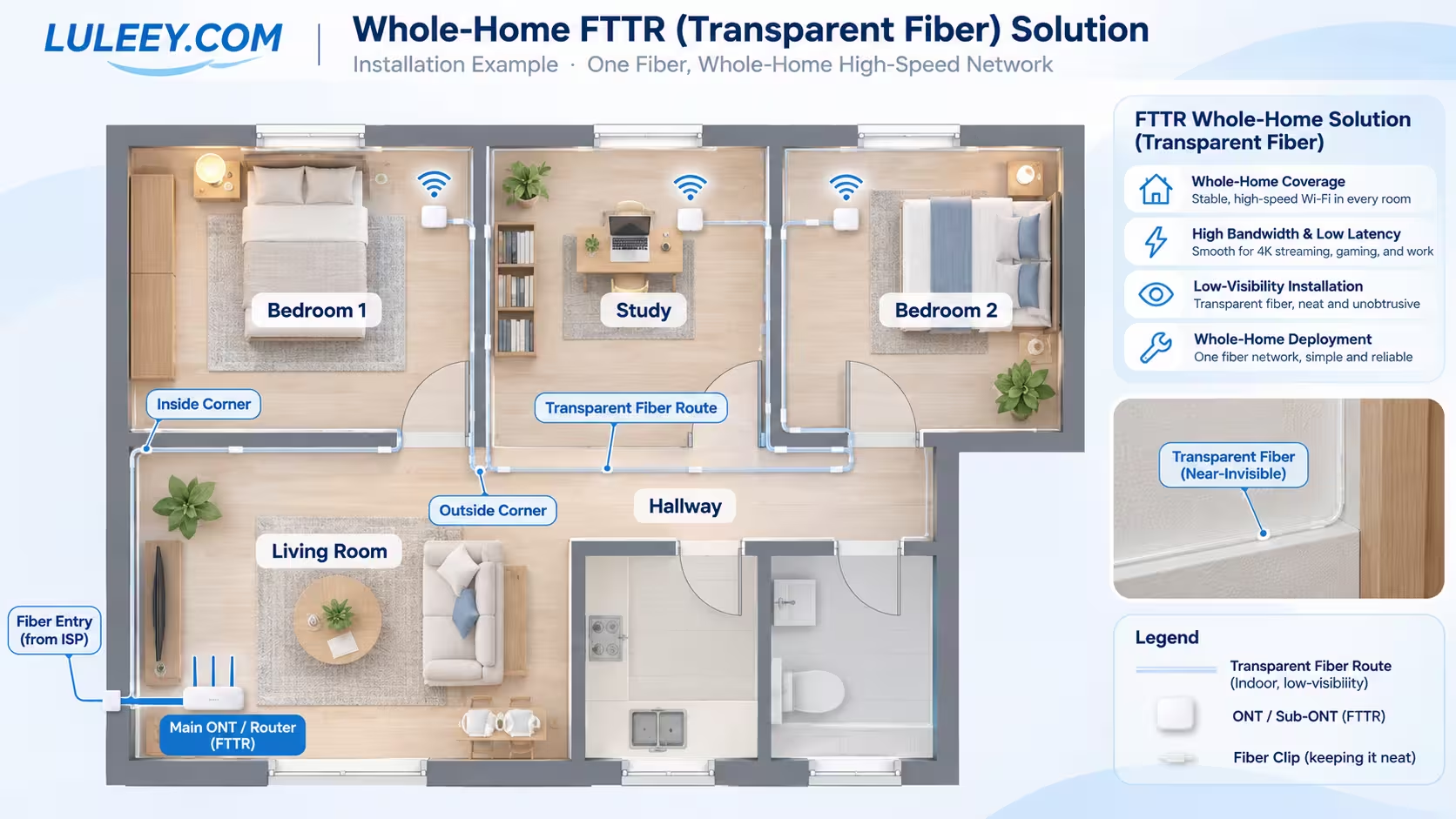
How Does a Transparent Fiber Home Network Work?
There are two common ways to use transparent optical fiber indoors.
Option 1 — Extend an Existing FTTH Fiber Connection
Use transparent fiber to connect an existing optical termination point to an ONT or other compatible optical device at a more convenient location.
Typical Connection
ISP Fiber Entry / Optical Wall Outlet
↓
Transparent G.657A2 Fiber Cable
↓
Compatible ONT / Optical Terminal
↓
Ethernet Router / Home Network
This is useful when the original optical outlet is installed in an inconvenient location and the customer wants to relocate the optical connection without running a highly visible cable.
The installed connector type and optical link must match the existing broadband equipment.
Option 2 — Build a Multi-Room FTTR Fiber Network
In a compatible FTTR system, a main optical networking unit or optical distribution system connects to optical nodes in individual rooms.
Typical Connection
ISP Fiber Access
↓
Main FTTR Unit / Optical Distribution
↓
Separate Transparent Fiber Runs
↓
Bedroom Optical Node / Study Optical Node / Home Office Optical Node
↓
Wi-Fi or Ethernet Connections in Each Room
Each room connection is planned according to the requirements of the FTTR equipment and optical distribution architecture.
Transparent fiber provides the physical optical link. Compatible main units, optical distribution components and room devices are required to deliver network services.
Important: Transparent fiber does not generate Wi-Fi by itself. Wi-Fi coverage depends on the connected routers, access points or FTTR room devices.
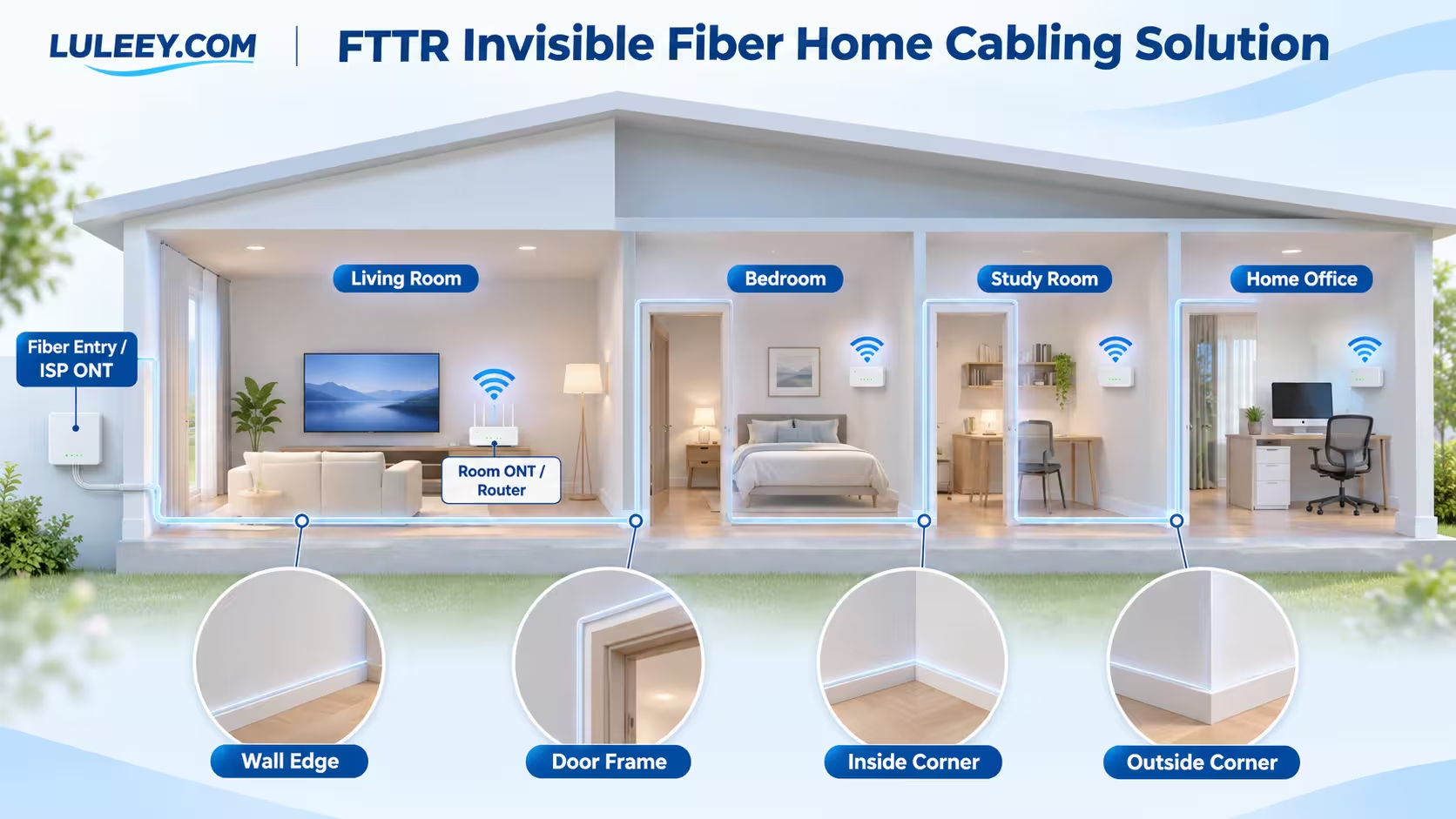
Where Can Transparent Fiber Be Installed?
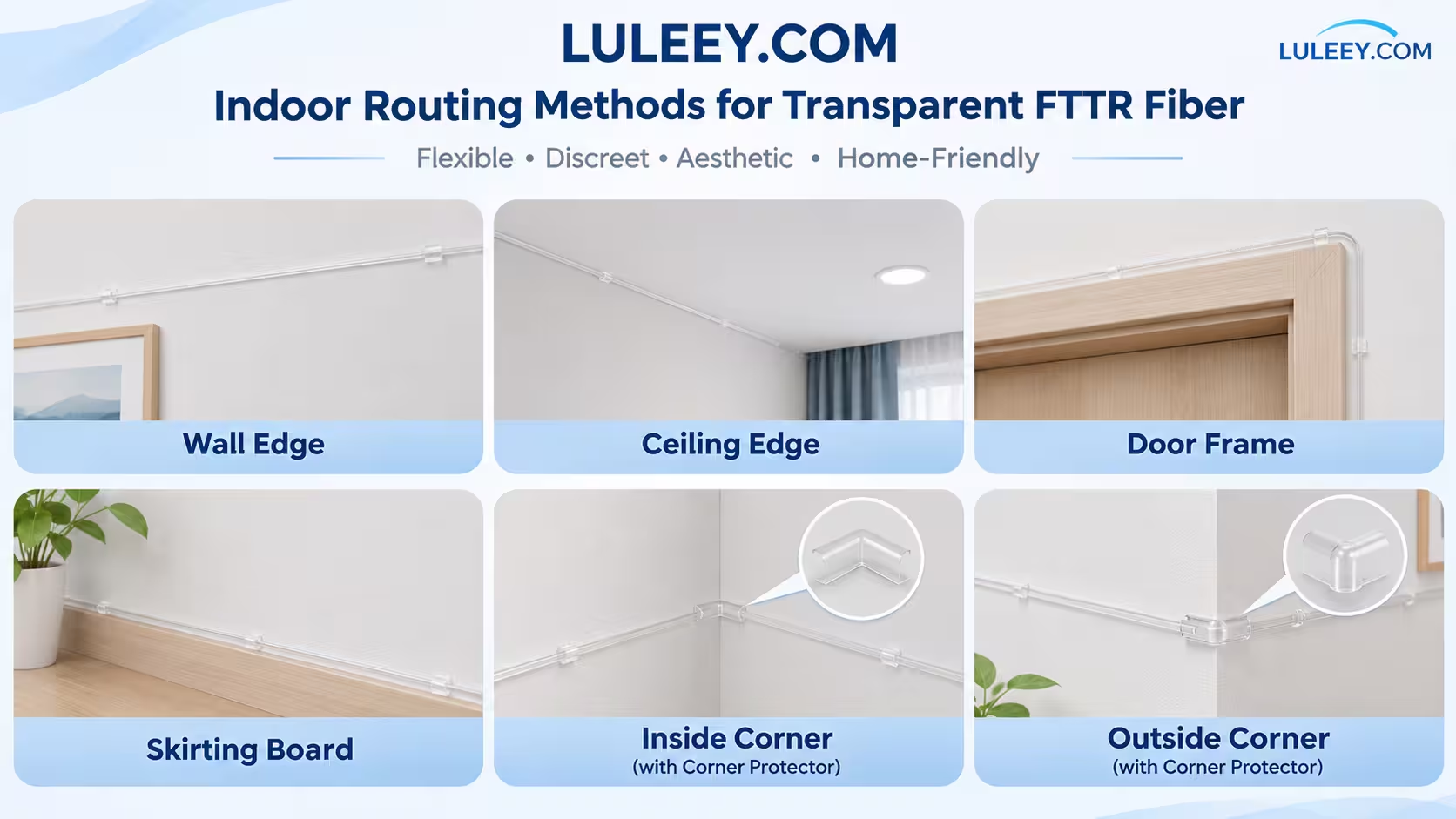
Transparent indoor fiber can follow architectural features that are already present in a room, helping make cable routes less noticeable.
| Installation Route | Recommended Use |
|---|---|
| Wall Edge | Long straight cable runs along walls |
| Ceiling Edge | Routing near the ceiling and wall junction |
| Door Frame | Passing around door openings between rooms |
| Skirting Board | Low-level routing along baseboards |
| Inside Corner | Turning around internal wall corners |
| Outside Corner | Routing around external wall edges |
Wall Edge
Route the fiber along a clean wall edge or decoration line where the cable can blend with the surrounding surface.
This is a practical option for living rooms, corridors, bedrooms and home offices.
Ceiling Edge
Ceiling-level routing can keep the cable away from furniture and frequent contact.
It is particularly useful where a high-level path provides a more discreet installation.
Door Frame
Door frames provide a practical route between rooms without placing visible cables across the center of a wall.
Plan the path around the frame and avoid locations where the door could pinch or damage the fiber.
Skirting Board
Running transparent fiber along the upper edge of a skirting board helps hide the cable at a natural architectural junction.
This is useful for apartments and homes where floor-level routes are easier to access.
Inside and Outside Corners
Wall corners require special attention because sharp bends can introduce optical loss or mechanical stress.
Luleey provides separate inside-corner and outside-corner protectors to guide transparent fiber around turning points.
View FTTR Fiber Corner Protectors
Complete Your Indoor Fiber Route with Corner Protectors
A transparent fiber cable is only one part of a clean indoor installation.
Wall corners, door frames and decoration edges can create tight turning points where unsupported fiber may be exposed to repeated stress.
Using the correct corner protector helps guide the cable around these transitions.
Inside Corner Protector
Designed for internal wall corners where two wall surfaces meet.
It helps maintain an appropriate cable path and reduces the risk of a sharp fold at the corner.
Outside Corner Protector
Designed for external wall edges where the cable needs to turn around a protruding corner.
It provides a smoother route and helps protect the cable from contact around exposed edges.
Both accessories are suitable for indoor transparent fiber installation.
Recommended Combination
Transparent Fiber Cable + Inside Corner Protectors + Outside Corner Protectors
Choose the number and type of protectors according to the actual installation path.
Shop Inside & Outside Corner Protectors
Why Choose G.657A2 Transparent Fiber?
Indoor fiber cabling must often follow narrow paths, door frames and wall corners.
G.657A2 is a bend-insensitive single-mode fiber category designed to offer improved bending performance compared with conventional G.652.D fiber.
Better Suited to Indoor Routing
G.657A2 fiber is useful where the cable must follow architectural edges and controlled bends.
Single-Mode Optical Transmission
The fiber is suitable for compatible single-mode optical networking applications, including FTTH extensions and FTTR systems.
Low-Visibility Appearance
The transparent cable construction is less noticeable than many conventional colored indoor fiber cables.
It is not completely invisible, but it can blend more naturally with light-colored walls, trim and decoration.
Flexible Installation Planning
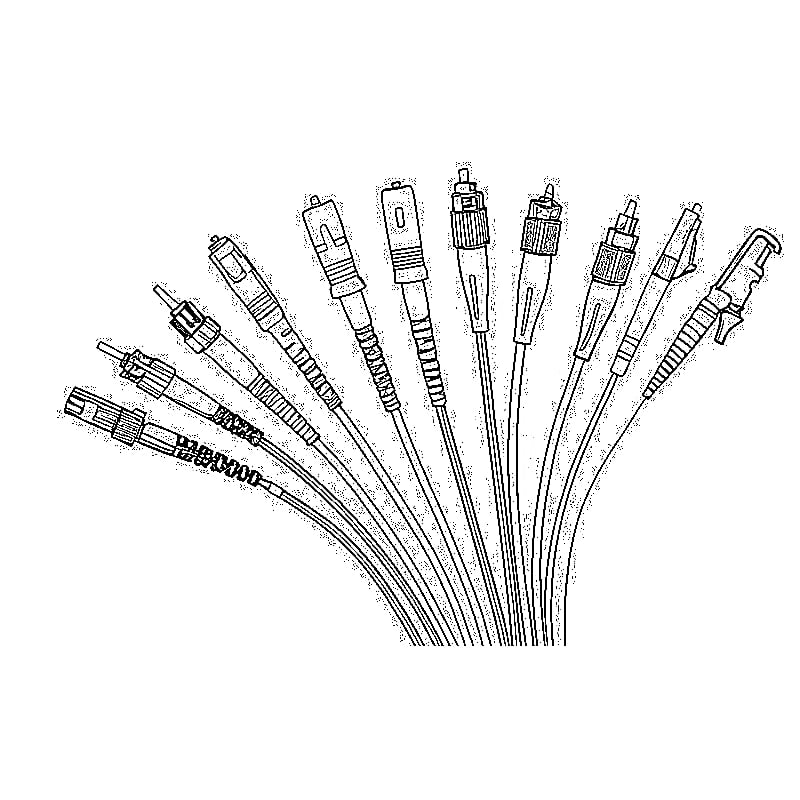
Different connector configurations and cable lengths are available to suit a wide range of indoor optical connection requirements.
Installation Note: Bend-insensitive does not mean unlimited bending. Follow the minimum bend radius specified for the finished cable assembly and use suitable guides at corners.
Choose the Correct Fiber Connector
Before ordering, check the optical interface on the device or wall outlet at both ends of the planned fiber route.
Luleey provides multiple connector options for different installation requirements.
| Connector Configuration | Typical Application |
|---|---|
| SC/APC to SC/APC | Common FTTH, PON and compatible FTTR interfaces |
| SC/UPC to SC/UPC | Equipment with SC/UPC optical ports |
| LC/UPC to LC/UPC | Compatible compact optical interfaces |
| FC/APC to FC/APC | Specialized telecom and optical test equipment |
| Headless | Field termination, fusion splicing or custom installation |
SC/APC or SC/UPC?
SC/APC connectors are commonly identified by their green housings and angled-polished optical end faces.
SC/UPC connectors commonly use blue housings and a different end-face geometry.
Do not directly mate SC/APC with SC/UPC.
The correct connector must match the existing optical equipment.
When Should I Choose Headless Fiber?
Headless fiber is suitable when the installer intends to terminate or splice the cable on site.
It is generally more appropriate for professional installations requiring field termination tools and optical testing.
For a straightforward connection between existing compatible optical ports, a factory-terminated cable is usually easier to install.
Choose Your Transparent Fiber Cable
How Much Transparent Fiber Do I Need?
The required cable length should be based on the actual indoor route, not the straight-line distance between two rooms.
A fiber path may need to travel along walls, around doors, through corridors and around furniture or architectural features.
Step 1 — Measure the Actual Route
Start from the optical connection point and follow the planned wall-edge or ceiling-edge path to the destination.
Include horizontal and vertical sections.
Step 2 — Count the Turning Points
Identify door frames, inside corners, outside corners and other transitions that may require accessories.
Step 3 — Allow Installation Margin
For basic planning, allow approximately 10–15% additional cable length, depending on the route, equipment position and termination requirements.
For example:
| Planning Item | Example |
|---|---|
| Measured Cable Route | 18m |
| 10% Additional Allowance | 1.8m |
| Estimated Requirement | 19.8m |
| Cable Selection | Choose a suitable available length with adequate slack |
Avoid selecting a cable that is exactly equal to the measured route.
Step 4 — Check the Connector Installation Path
Pre-terminated optical connectors are larger than the transparent fiber itself.
Before ordering a connectorized cable, make sure that the connector can pass through any required opening or installation route without damage.
For more complex routing, headless fiber with professional field termination may be more suitable.
Home Cabling Examples
Small Apartment — Simple Fiber Extension
Best For: Relocating an existing optical connection between two rooms.
Example Route
Fiber Entry / Optical Outlet
↓
Living Room Wall Edge
↓
Door Frame
↓
Bedroom / Study Optical Terminal
Recommended Components: One transparent fiber cable of the required length, matching optical connectors and suitable corner protectors.
This is a simple point-to-point optical extension that does not require a whole-home FTTR equipment system.
Three-Bedroom Home — Multi-Room FTTR
Best For: Homes where a compatible FTTR system distributes optical connectivity to several rooms.
Example Architecture
Main FTTR Unit / Optical Distribution
↓
Individual Fiber Runs
↓
Bedroom 1 / Bedroom 2 / Study / Home Office
Each room receives its own planned optical route according to the system architecture.
Transparent fiber can follow hallway walls, door frames and room edges to reduce visible cabling.
Recommended Components: Multiple transparent fiber runs, inside/outside corner protectors, matching connector configurations and compatible FTTR optical devices.
Villa or Multi-Floor Home — Extended Indoor Cabling
Best For: Larger homes requiring connections between floors or distant rooms.
Example Architecture
Main Fiber Distribution Area
↓
Vertical Fiber Route / Floor Distribution
↓
Separate Indoor Fiber Runs
↓
Room Optical Terminals
For multi-floor properties, the optical distribution design, vertical cable protection and equipment compatibility should be planned before installation.
Use suitable protected pathways where the cable crosses exposed or mechanically demanding areas.
Hotel or Office — Room-by-Room Fiber Deployment
Best For: Commercial buildings with repeated room layouts and a requirement for discreet cabling.
Example Architecture
Telecom Equipment Room
↓
Protected Corridor Fiber Backbone
↓
Designed Fiber Distribution Points
↓
Individual Transparent Fiber Runs
↓
Guest Rooms / Offices / Equipment
This approach allows the main corridor infrastructure to use suitable backbone cabling while transparent indoor fiber provides less visible room-entry connections.
Project requirements may include different cable lengths, connector types, room labeling and installation routing plans.
For larger projects, provide the building layout and required number of room connections for configuration review.
Recommended Luleey FTTR Cabling Products
FTTR Transparent Fiber Optic Cable — G.657A2
For discreet indoor optical connections
A transparent, bend-insensitive single-mode fiber cable designed for indoor optical routing in homes, apartments, hotels and offices.
Suitable for wall-edge, ceiling-edge, door-frame and skirting-board installations.
Available in multiple lengths and connector configurations, including SC/APC, SC/UPC, LC/UPC, FC/APC and headless.
FTTR Invisible Fiber Corner Protector
For cleaner and safer corner routing
Transparent corner-routing accessories help guide the fiber around internal and external wall corners.
Available as inside-corner and outside-corner versions.
Custom Indoor Fiber Cabling Requirements
For homes, hotels and project installations
Different buildings may require special cable lengths, optical connector configurations, installation paths or quantity planning.
Provide the planned route, destination equipment and connector requirements for review.
Discuss a Custom Cabling Project
How to Install Transparent Indoor Fiber
1. Plan the Fiber Route
Identify the start and end optical interfaces and select a route along suitable indoor surfaces.
Avoid areas with frequent impact, excessive heat or moving mechanical parts.
2. Confirm Connector Compatibility
Check the connector type at both ends before installing the fiber.
Do not mix APC and UPC interfaces directly.
3. Prepare the Installation Surface
Make sure the wall or trim surface is clean, dry and suitable for the intended fixing method.
Use compatible clips, adhesive systems or protective accessories according to the cable and surface requirements.
4. Route the Cable Carefully
Follow the planned wall, ceiling or skirting-board route.
Avoid pulling the cable tightly, twisting it or creating sharp bends.
5. Install Corner Protectors
Use suitable inside-corner or outside-corner protectors where the route changes direction.
Do not force the cable around an unsupported 90-degree turn.
6. Connect the Optical Equipment
Connect the cable only to compatible optical interfaces.
Keep optical connector end faces clean and protected from dust.
7. Check the Connection
After installation, verify the optical signal and network connection using appropriate equipment.
For professional FTTR projects, test the installed optical path according to the system requirements.
Transparent Fiber vs Traditional Indoor Fiber Cable
| Feature | Transparent Indoor Fiber | Conventional Indoor Fiber |
|---|---|---|
| Appearance | Transparent / Low-Visibility | Often Colored or More Visible |
| Indoor Decoration | Easier to Conceal Along Edges | May Require a More Visible Route |
| Fiber Construction | G.657A2 on This Luleey Model | Depends on Cable Type |
| Typical Application | Discreet FTTR / FTTH Indoor Routing | General Indoor Fiber Cabling |
| Connector Options | Multiple Configurations | Depends on Product |
| Installation Protection | Corner Guides Recommended | Depends on Construction |
Transparent fiber is particularly useful when the appearance of the installation is an important requirement.
Conventional protected indoor cables may be better suited to routes with greater mechanical exposure.
Select the cable according to the installation environment rather than appearance alone.
Important FTTR Installation Considerations
Fiber Cabling Is Not a Complete FTTR System
Transparent optical fiber is a passive cabling component.
A complete multi-room FTTR network may require a main FTTR unit, optical distribution components and compatible room optical terminals.
One Fiber Cannot Automatically Serve Every Room
A single continuous fiber cable does not automatically provide independent optical connections for several rooms.
Multi-room distribution requires an appropriate optical architecture, which may include separate fiber runs or compatible passive optical distribution equipment.
Transparent Does Not Mean Completely Invisible
Cable visibility depends on the surface color, lighting, routing method and installation quality.
Bending Performance Still Matters
Use an appropriate cable bend radius and protective accessories.
Indoor Cable Is Not Automatically Outdoor-Rated
Use this solution for suitable indoor environments. Exposed outdoor routes require cables and protection specifically rated for those conditions.
Frequently Asked Questions
What is FTTR transparent fiber cable?
FTTR transparent fiber cable is an indoor optical cable with a low-visibility outer construction. It is used for discreet fiber routing in homes, offices and compatible fiber-to-the-room networks.
Can I use transparent fiber to extend my existing FTTH connection?
Yes, when the cable, optical connectors and link requirements are compatible with the existing FTTH system. The ISP’s installation requirements should also be respected.
Will transparent fiber improve my Wi-Fi coverage?
Not by itself. The cable provides an optical connection. Improved room coverage requires compatible networking equipment, such as an FTTR room device or wireless access point.
Is transparent fiber completely invisible?
No. It is designed to be less noticeable than many conventional colored fiber cables, especially when routed along suitable wall edges and interior trim.
Can I install it around corners?
Yes, when the cable is routed within its permitted bend limits. Appropriate inside and outside corner protectors are recommended for turning points.
Can I install the cable without drilling holes?
Some surface-routing installations can be completed using suitable clips or adhesive fixing methods without drilling. This depends on the existing building layout, surface conditions and whether the cable or connectors must pass through walls or floors.
What is G.657A2 fiber?
G.657A2 is a bend-insensitive single-mode optical fiber category designed to reduce bending-related optical loss compared with conventional single-mode fiber.
Which connector should I choose?
Choose the connector that matches your optical terminal or equipment interface. SC/APC is common in many FTTH/PON installations, but SC/UPC, LC/UPC and other configurations are also used.
Can I connect SC/APC directly to SC/UPC?
No. APC and UPC use different polishing geometries and should not be directly mated.
How do I calculate the required cable length?
Measure the actual route along walls, doors and corners, then include installation slack. Do not rely only on the straight-line distance between rooms.
Can I use the cable for a hotel or office?
Yes. Transparent indoor fiber can be used for suitable room-entry and indoor optical connections. Larger installations should be planned with the appropriate backbone, optical distribution and equipment architecture.
Do I need an optical splitter for multiple rooms?
That depends on the FTTR system design. Some systems require compatible passive optical distribution, while other architectures use dedicated optical connections. The splitter and optical power budget must match the equipment.
Can the cable be used outdoors?
This Luleey product is intended for indoor applications. Outdoor installation requires suitable outdoor-rated cable and environmental protection.
Can I order custom lengths or connector configurations?
Luleey offers multiple standard lengths and connector options. Special project requirements can be reviewed before ordering.
Plan Your Indoor Fiber Route
Choose the Right Components for Your Home or Project
Before ordering, identify the connection points, cable route and required optical interfaces.
| Planning Item | What to Confirm |
|---|---|
| Installation Type | FTTH Extension / FTTR / Office / Hotel |
| Number of Routes | One Link / Multiple Rooms |
| Cable Length | Measured Path + Installation Margin |
| Connector Type | SC/APC / SC/UPC / LC/UPC / FC/APC / Headless |
| Inside Corners | Number Required |
| Outside Corners | Number Required |
| Optical Equipment | ONT / FTTR Unit / Optical Terminal |
| Custom Requirements | Floor Plan / Route Drawing / Quantity |
For simple installations, choose the required transparent fiber cable and matching corner protectors directly.
For larger homes, hotels and commercial projects, share the intended optical network layout and cabling requirements.
Clean Indoor Routing. Flexible Fiber Connections. Less Visible Cabling.
Shop FTTR Transparent Fiber Cable

 SFP/SFP+ (1G/2.5G/5G/10G)
 SFP-T (1G/2.5G/10G)
 AOC Cable 10G/25G/40G/100G
 DAC Cable 10G/25G/40G/100G
 QSFP28 QSFP+ SFP28 100G/40G/25G
 Copper to Fiber Media Converters
 Fiber Media Converter PCBA Board
 OEO Fiber Media Converters
 Serial to Fiber Media Converters
 Video to Fiber Media Converters
 1000M GPON/EPON ONU
 10G EPON ONU/XG-PON/XGS-PON
 2.5G GPON/XPON STICK SFP ONU
 POE GPON/EPON ONU
 Wireless GPON/EPON ONT
 EPON OLT
 GPON OLT
 SFP PON Module
 Industrial Switches
 Managed Switches
 POE Switches
 Unmanaged Switches
 MTP/MPO Fiber Cables
 Fiber Optic Cassettes
 Fiber Optic Loopback
 Optic Cables and Fiber Pigtails
 Optical Splitters and Splitter Box
 Fiber Flange Connectors
 Optical Adapters
 Optical Attenuator
 Quick Connector and Connector Panel
 CATV Amplifier
 CATV Optical Receiver
 Visual Fault Locator
 OTDR
 Optical Power Meter
 Fiber Optic Identifier
 Fiber Optic Cleaners
 Fiber Cleavers & Fiber Strippers
 Copper Tools