Customs duties are the responsibility of customers, but standard logistics support DDP to most countries, duty-free such as US, DE, UK, CA, FR, IT, PL, AT, JP…





















































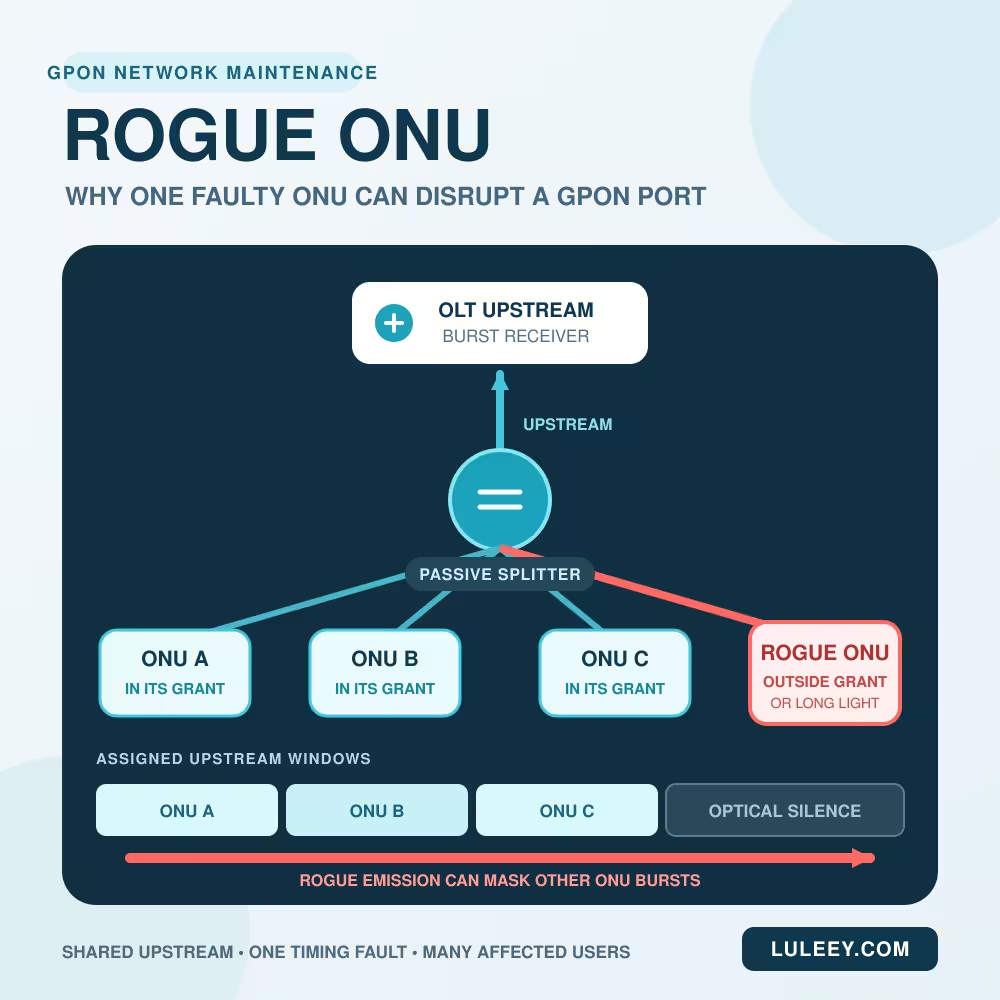
A Rogue ONU can do more than lose its own service. If it transmits upstream light outside the time assigned by the OLT, it can interfere with bursts from other ONUs on the same GPON port. The result may look like a feeder fault: several customers disconnect, flap between states, or fail to register at the same time.
The key is to prove the shared-port pattern before replacing equipment. A normal offline ONU is not automatically rogue, and the ONU that still appears online may even be the faulty one.
What Is a Rogue ONU?
In field language, a rogue ONU or Rogue ONT is an optical network terminal whose upstream transmitter behaves outside the rules of the PON. “Long-Light ONU” usually describes the obvious case: its laser remains on for too long or continuously.
The more exact definition is broader. ITU-T G-series Supplement 49 says that an ONU should transmit at its specified on-power only in time slots allocated by the OLT and remain below the off-power limit at other times. An ONU emitting above that off-power level outside its allocation is rogue.
That means a rogue condition may be:
- Continuous, with the transmitter stuck on
- Intermittent, so the port fails only at certain times
- A timing drift that places part of a burst outside its grant
- An abnormal transmission caused by software, MAC, firmware or transmitter hardware failure
It is a transmission-behavior fault, not a synonym for “unregistered,” “unsupported,” or “low optical power.”
Why One Rogue ONU Can Affect a Whole GPON Port
ITU-T G.984.3 specifies upstream time-division multiple access for GPON. The OLT grants each ONU a transmission window. The passive splitter then combines all upstream light onto the shared feeder toward the OLT burst receiver.
Under normal operation, the bursts arrive in sequence:
ONU A → ONU B → ONU C → optical silence → next grants
If ONU C emits during ONU A’s window or during an optical-silence interval, the OLT receives overlapping or unexpected light. It may be unable to recover the intended burst. ITU-T Supplement 49 notes that continuous or out-of-timeslot transmission can impair communications to all ONUs on the PON, although the exact impact can be intermittent or low-level.
This explains an important troubleshooting trap: the ONU that cannot register may be an innocent victim. Do not identify the rogue device only by asking which ONU is offline.
Rogue ONU Symptoms: Look for the Shared Failure Pattern
No single symptom proves a rogue ONU. Use the combination of scope, timing, OLT evidence and controlled isolation.
| Observation | What it suggests | Better next check |
|---|---|---|
| One ONU is offline; peers on the same PON port remain stable | Local drop, power, optics, identity or provisioning is more likely | Inspect that ONU and drop first |
| Several unrelated ONUs on one PON port fail together | Rogue ONU, feeder/splitter fault, OLT-port fault or common power problem | Compare timestamps and OLT alarms |
| Several PON ports or a whole card fail | A rogue ONU on one branch is less likely | Check line card, uplink, chassis power and shared configuration |
| OLT reports unexpected optical power, burst errors or a rogue/long-light alarm | Rogue behavior is plausible | Preserve logs and use the model’s supported detection workflow |
| Other ONUs recover when one splitter branch is isolated | Strong evidence that the fault is inside that branch | Narrow from branch to individual ONU |
| One ONU remains in stable O5 but only that user has no IP | Usually a service-layer issue, not a shared-port rogue event | Check VLAN, DHCP/PPPoE and provisioning |
The Fiber Optic Association’s FTTH troubleshooting guide also describes a rogue ONT as transmitting randomly or continuously outside the correct time slot, preventing other ONTs on the same port from communicating with the OLT.
What a Rogue ONU Is Not
Not every multi-user outage
A feeder break, damaged splitter, disabled OLT port, line-card problem, power failure or badly disturbed connector can also affect multiple subscribers. A simultaneous outage is a scope clue, not a final diagnosis.
Not simply low or high optical power
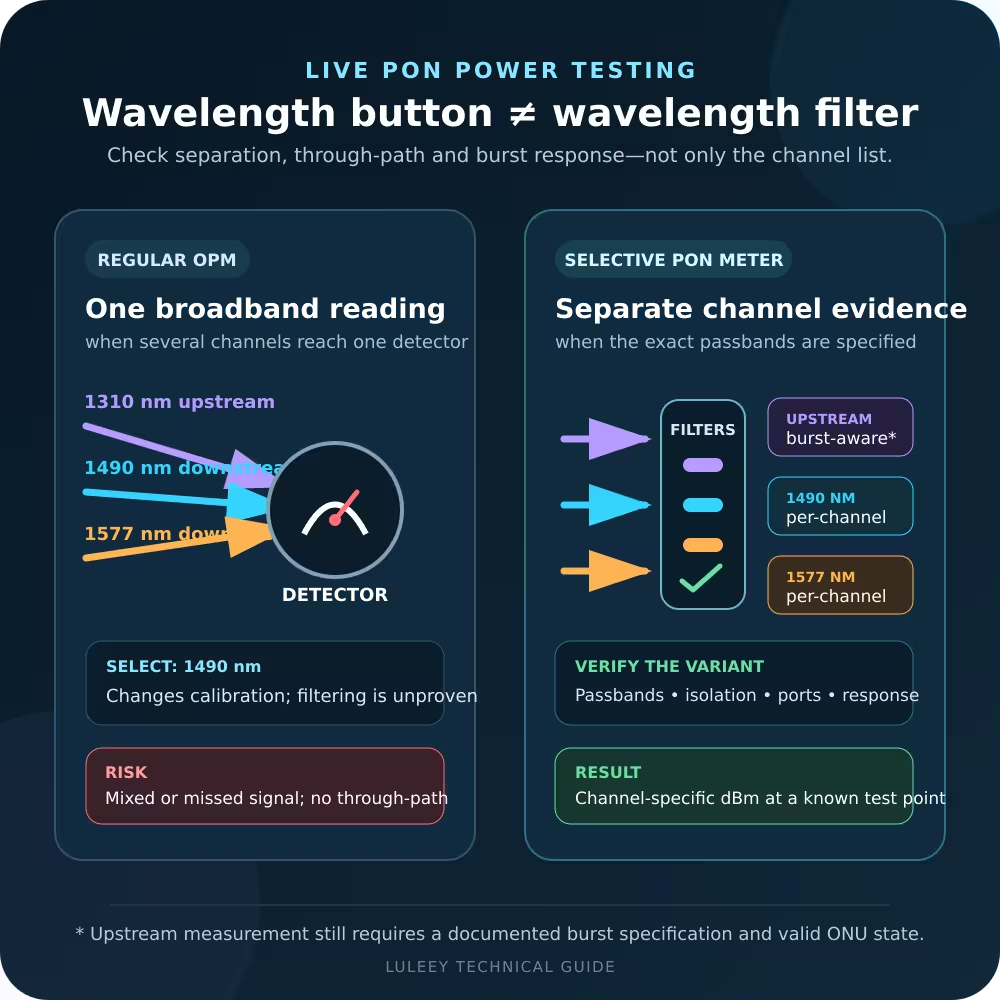
A normal power reading in one reported time slot does not rule out a stuck transmitter. ITU-T Supplement 49 explains that a full-power rogue may look normal in its own slot while raising received power in other slots. A standard optical power meter usually cannot associate unexpected light with a specific ONU and allocation. Use OLT timing, burst and alarm data or a suitable burst-aware method.
Not the same as O5 with no Internet
If only one ONU remains stable in O5 but has no WAN address, move above the PON layer. LuLeey’s guide to an ONU in O5 with no DHCP IP covers VLAN, WAN mode, DHCP/PPPoE and service mapping.
Not proven by an SFP or SFP+ label
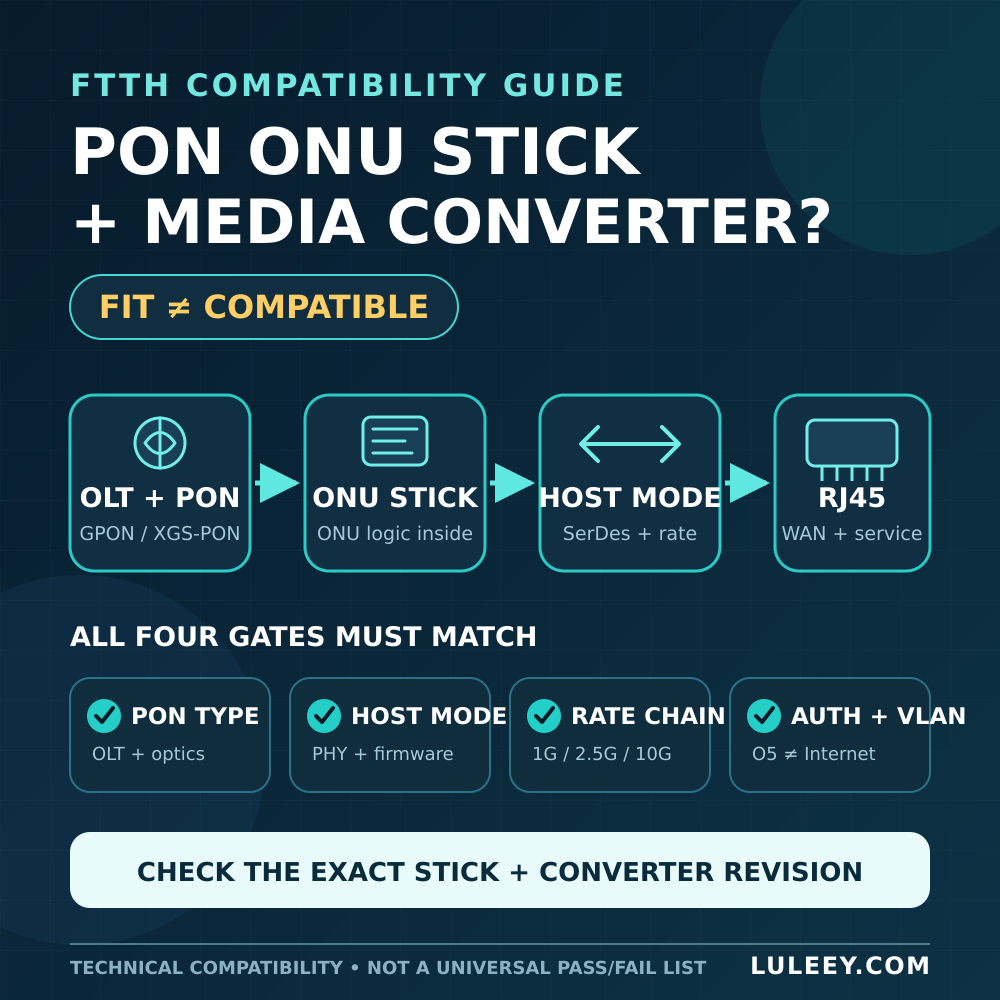
For an ONU Stick, host-side link compatibility and PON-side burst behavior are separate questions. Do not infer either from the cage name or nominal module rate. Verify the exact Stick and host models, host PHY/SerDes, firmware and driver, port setting, module coding, Stick host mode, actual negotiated host rate and usable throughput. An unsupported host path can break local service, but it does not by itself prove that the ONU is transmitting outside its PON grant.
Rogue ONU Troubleshooting Workflow
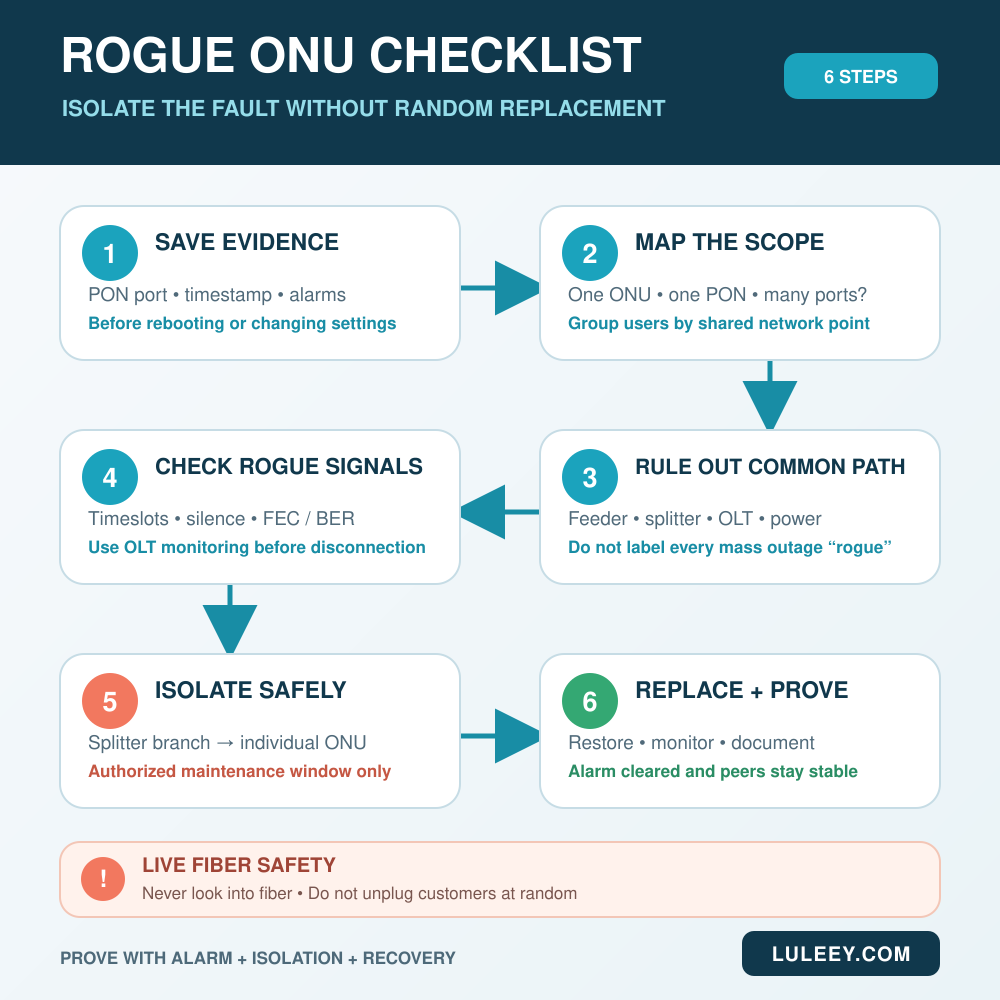
Use non-invasive evidence first. Physical branch isolation can interrupt healthy subscribers and should be done only by authorized staff during an approved maintenance window.
1. Save the evidence before rebooting
Record:
- OLT, line card, PON port and software release
- Alarm names, timestamps and clear times
- ONUs affected at each timestamp
- Registration-state changes and upstream error counters
- Recent firmware, provisioning, splitter or field-work changes
Rebooting first may remove the timing evidence that separates a rogue event from a common-path outage.
2. Define the blast radius
Group the affected subscribers by network hierarchy:
- One ONU
- One splitter branch
- One PON port
- Several ports on one card
- Several OLTs or an upstream aggregation path
A rogue ONU should point back to a shared PON channel. If failures cross unrelated ports, widen the investigation before isolating subscriber branches.
3. Rule out the common physical and OLT causes
Check the feeder, splitter route, OLT port state, line-card health, chassis power and recent maintenance. Compare optical trends instead of relying on one reading taken after recovery.
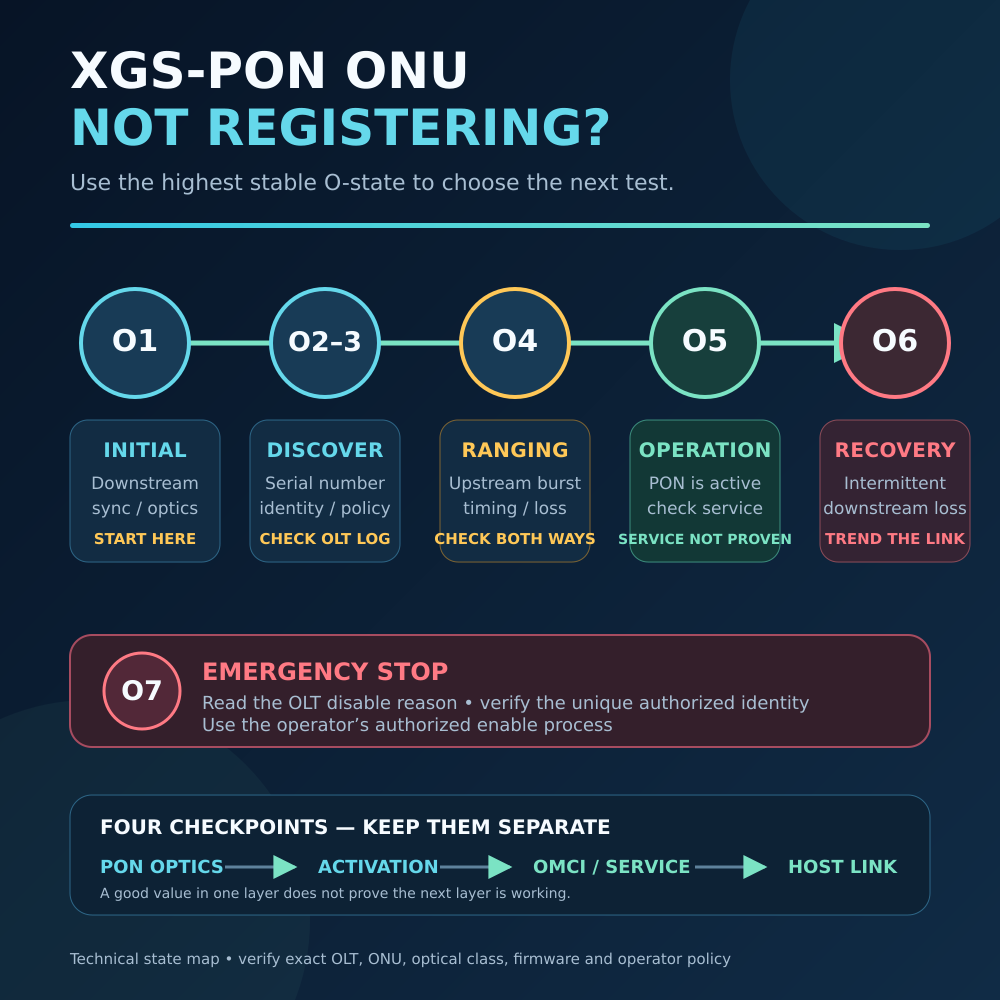
If activation state is the main clue, use LuLeey’s O1–O7 ONU registration workflow to keep downstream synchronization, discovery, ranging, service provisioning and OLT disable actions separate. Its examples are XGS-PON-specific, so match the state and procedure to the exact GPON equipment documentation.
4. Use OLT monitoring before disconnecting fibers
On the exact OLT model and software release, look for supported evidence such as:
- Optical power detected during a silence interval
- A burst arriving outside its allocation
- Timing drift or failed drift compensation
- Abnormal upstream FEC or BER patterns
- Burst delineation failures
- A rogue, continuous-emission or long-light alarm
Alarm names and thresholds are vendor- and release-specific. Do not paste commands from another platform. Back up the configuration and follow the current manual for the deployed model.
5. Isolate by topology and confirm the suspect ONU
If the OLT cannot identify the ONU non-invasively, use the splitter map to narrow the fault:
- Announce a maintenance window and identify affected customers.
- Isolate one downstream splitter branch using the approved procedure.
- Watch whether peer ONUs recover and whether the alarm clears.
- Reconnect or keep isolated according to the change plan.
- Repeat within the suspect branch until one ONU or drop is identified.
Never look into a fiber or optical port. Treat every unknown connector as active. Do not unplug customers at random; each change should test a written hypothesis and be logged.
Before replacement, correlate at least two forms of evidence:
- OLT rogue/long-light alarm points to the same branch or ONU
- Removing the suspect restores other ONUs
- Reconnecting it reproduces the fault under controlled conditions
- A supported diagnostic shows out-of-allocation light or burst errors
Do not repeatedly reproduce a disruptive condition on a production network. One controlled confirmation may be enough when the alarm and recovery pattern agree.
6. Replace, restore and monitor
Use an authorized ONU of the correct PON generation, optical class and supported firmware. Restore the approved identity and service profile; do not clone another subscriber’s credentials.
Then verify:
- The rogue alarm stays cleared
- Peer ONUs remain stable through the observation period
- Upstream error counters return to their normal baseline
- The replacement reaches the expected activation state
- Subscriber VLAN, DHCP/PPPoE and traffic work normally
Document the failed hardware/firmware version and the exact evidence. That turns a one-time fix into a faster response for the next incident.
Check Rogue-ONU Detection When Selecting an OLT
The current LuLeey LL-GPOLT-XE-G08 8-PON GPON OLT page lists detection of abnormal light-emitting ONUs, including long-light emission. The same page identifies the model as LL-GPOLT-XE-G08 and lists GPON support under ITU-T G.984/G.988.
This confirms that the feature is published for that model; it does not establish the detection algorithm, alarm thresholds, automatic isolation behavior or command syntax for every firmware release. Verify the exact software build and operating procedure before depending on any automatic action.
Practical Next Step
Before the next shared-port outage, create a map from OLT port to splitter branch and ONU ID, retain time-synchronized alarms, and test the approved rogue-detection workflow in a lab or maintenance window. During an incident, work from evidence to scope, then from branch to ONU. That is faster—and safer—than replacing every terminal that happens to be offline.


 SFP/SFP+ (1G/2.5G/5G/10G)
 SFP-T (1G/2.5G/10G)
 AOC Cable 10G/25G/40G/100G
 DAC Cable 10G/25G/40G/100G
 QSFP28 QSFP+ SFP28 100G/40G/25G
 Copper to Fiber Media Converters
 Fiber Media Converter PCBA Board
 OEO Fiber Media Converters
 Serial to Fiber Media Converters
 Video to Fiber Media Converters
 1000M GPON/EPON ONU
 10G EPON ONU/XG-PON/XGS-PON
 2.5G GPON/XPON STICK SFP ONU
 POE GPON/EPON ONU
 Wireless GPON/EPON ONT
 EPON OLT
 GPON OLT
 SFP PON Module
 Industrial Switches
 Managed Switches
 POE Switches
 Unmanaged Switches
 MTP/MPO Fiber Cables
 Fiber Optic Cassettes
 Fiber Optic Loopback
 Optic Cables and Fiber Pigtails
 Optical Splitters and Splitter Box
 Fiber Flange Connectors
 Optical Adapters
 Optical Attenuator
 Quick Connector and Connector Panel
 CATV Amplifier
 CATV Optical Receiver
 Visual Fault Locator
 OTDR
OTDR Optical Power Meter
 Fiber Optic Identifier
 Fiber Optic Cleaners
 Fiber Cleavers & Fiber Strippers
 Copper Tools


